Adding a USB Wi-Fi adapter to a rooted Android tablet
Give a rooted tablet a second radio: USB host mode over the Type-C port, a driver built for its exact kernel, and monitor mode for packet capture. Android tablets make good remote clients, but their radios are fixed inside the device. A USB Wi-Fi adapter adds a second one — the reference hardware here is an ALFA AWUS1900 (Realtek RTL8814AU, The USB socket is the easy part. Everything after it is work: the tablet has to treat the port as a host, the kernel has to accept a driver it was never built with, and the driver has to be coaxed into monitor mode before packet capture tools are useful. Before buying anything, check whether your kernel already has a driver. RTL8814AU support landed in the in-kernel An adapter like this always ends up as a cfg80211 netdev — This has two consequences worth internalising: Host mode is decided on the Type-C port, by the PMIC and UCSI firmware, before any driver is involved. The port becomes a host only when it sees a partner presenting a 5.1k Rd on CC. The three outcomes are easy to tell apart: A charge-only cable gives you VBUS and nothing else: Do not force host mode by writing The port budget is 500 mA while the adapter can draw around 1 A. A powered hub with a C upstream gives back the throughput too: an A-to-C adapter chain negotiated full-speed 12 Mb/s in testing, where the direct OTG cable reached high-speed 480 Mb/s. An Android GKI kernel will not load a module built for a different kernel, and it fails in four different ways depending on which check you trip. The checks, in the order they usually bite: So the build is: the exact kernel source commit the device runs, the device’s own Two classes of bug compile silently and then trap at runtime, because Clang treats them as compatible while kCFI hashes the exact types: Both were fixed in the reference fork. The general lesson: grep the build log for suppressed pointer-type warnings instead of trusting a zero exit code, and compare the module’s The kernel also silently checks the layout of structures your driver fills in. On the reference device, Success looks like Android ships no Two traps stand between a working interface and a working capture. The first is a genuine driver bug on 6.0+ kernels. The second trap is specific to this driver, and it changes how you invoke tools. A separate Order matters. The type change must happen while the interface is down, and Once Android has no Python, no Three details cost real time: A small launcher keeps this repeatable — load the module, wait for the interface with a poll instead of a fixed sleep, force monitor mode, verify the radio is actually receiving by watching Verified on the reference hardware with the patched driver: Two operational notes from that table. Deauthing everything includes the client the tablet uses for its own network connection, so auditing the AP you are associated with costs you connectivity; prefer a second uplink or deauth a single client with Nothing about the driver is persistent: the module is unloaded on reboot, and the chroot’s bind mounts disappear with it. Everything else — the kernel module file, the rootfs, the launcher — lives on The launcher handles the rest: 0bda:8813) on a Lenovo TB321FU running Android 16.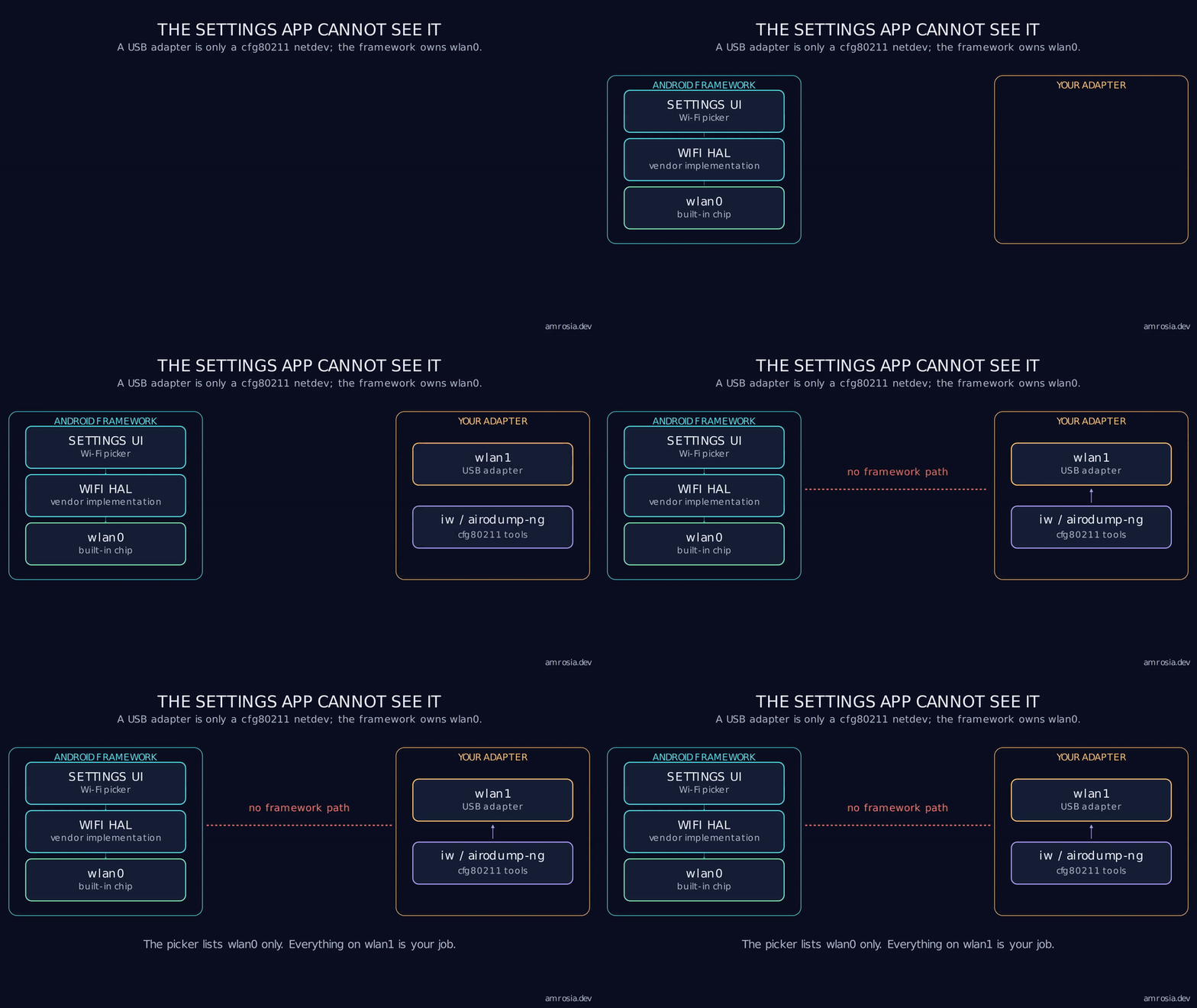
What you need
Item Requirement Adapter A chip with a maintained out-of-tree driver; the reference is RTL8814AU Cable Type-C to A OTG adapter that presents a 5.1k Rd on CC, or a hub with a C upstream Device Rooted Android; Magisk is enough, SELinux can stay enforcing Kernel facts MODULES, MODVERSIONS, CFI_CLANG state, MODULE_SIG_FORCE unset, and the exact kernel build (uname -a, /proc/config.gz)Build host The matching kernel source tree, the same Clang major version, pahole, bison, flex, dtcOptional A powered hub — the adapter alone can draw more than the port supplies rtw88 driver only in Linux 6.13+, and Android 14–16 tablets ship 6.1 or 6.6 kernels, so the in-tree option does not exist yet. That leaves the vendor-style out-of-tree module, which is what the rest of this post is about. The Android GKI patches and build instructions for the reference device are in my 8814au fork. Why the Wi-Fi picker never lists it
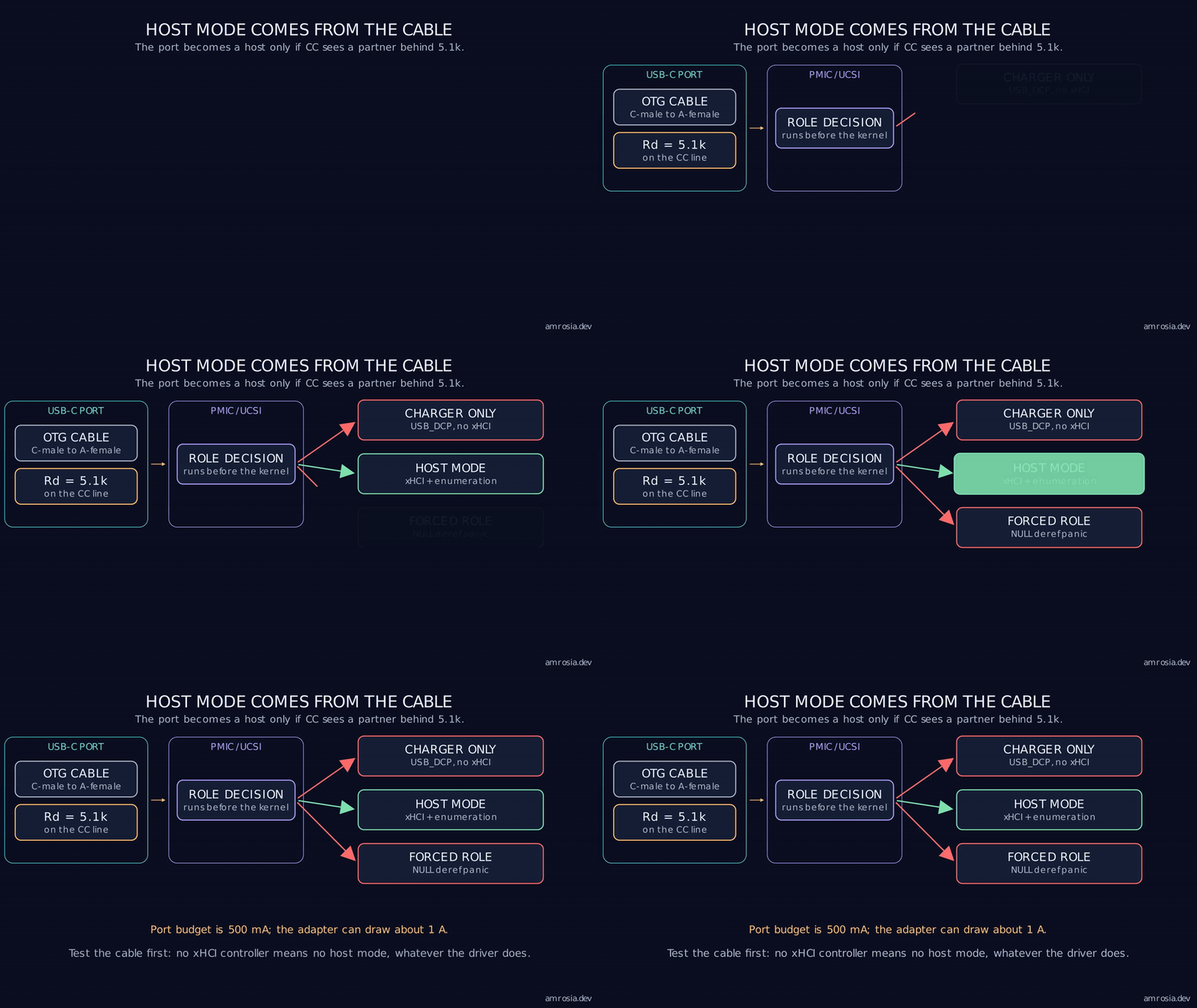
wlan1 next to the built-in wlan0. Android’s Wi-Fi UI does not talk to cfg80211; it talks to the vendor Wi-Fi HAL, which is bound to the built-in chip. There is no path from Settings to your adapter, and there is nothing to enable in Settings to create one.iw, wpa_supplicant and friends.wlan1 is invisible to the framework, including monitor mode, and it also cannot break the built-in Wi-Fi.ip link will show the interface, and that is the whole extent of Android’s awareness of it. Get the port into host mode
# is anything on the bus?
lsusb
ls /sys/bus/usb/devices/
# what did the port decide?
cat /sys/class/typec/port0/data_role /sys/class/typec/port0/power_role
cat /sys/class/usb_role/a600000.ssusb-role-switch/role
cat /sys/class/power_supply/usb/online /sys/class/power_supply/usb/type
power_supply/usb reports online=1 type=USB_DCP, no xhci platform device appears, and the device list stays empty. The tablet is a charger, not a host, and no amount of kernel or driver work changes that. With a real OTG adapter the port flips to [host]/[source], an xhci-hcd controller appears, and the adapter enumerates — in the reference setup at 480 Mb/s on usb 1-1.host to /sys/class/usb_role/*/role. With no partner attached this tablet panics in dwc3_msm_host_notifier with a NULL dereference, and the log contains no call trace and no module frame, so it looks like a driver bug and is not. Host mode has to come from the cable. Build the driver for this kernel
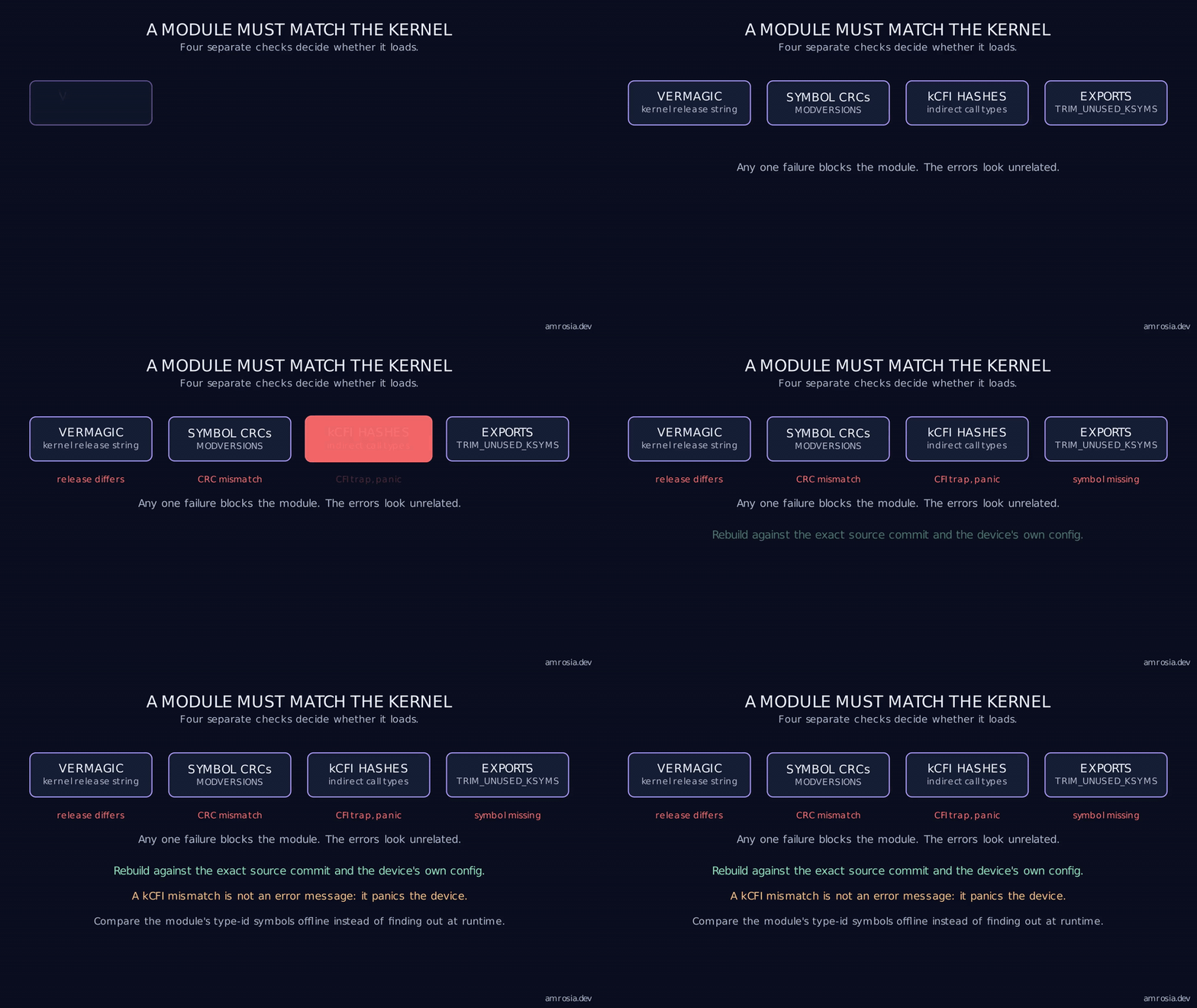
CONFIG_MODVERSIONS, every imported symbol carries a CRC of its prototype. Mismatch: disagrees about version of symbol.CONFIG_CFI_CLANG, each indirect call site checks the callee’s type hash. A mismatch is not an error message; it is CFI failure at … followed by a panic.CONFIG_TRIM_UNUSED_KSYMS, so functions nothing else in the kernel calls are not exported at all. filp_open, kern_path, kernel_read, kernel_write and yield are all absent on the reference device./proc/config.gz, and the same Clang major version — 17 in this case, since kCFI hashes and struct layouts are toolchain-dependent. The practical sequence and a template script are in the driver fork; the non-obvious parts are worth stating here because they cost the most time:# the device's own configuration, not a defconfig
adb shell 'cat /proc/config.gz' | gunzip > device.config
# module_layout is the fingerprint that proves the tree matches
modinfo 8814au.ko | grep -E 'vermagic|srcversion'
# build against the pinned source tree
make -C "$KERN" M="$PWD" ARCH=arm64 LLVM=1 CONFIG_RTL8814AU=m modules
Type mismatches that do not warn
tasklet_init takes void (*)(unsigned long); a callback declared void f(void *priv) needs a wrapper, not a cast. Likewise USB completion handlers must match void (*)(struct urb *) — the pre-4.14 struct pt_regs * form will trap on the first completion.ndo_start_xmit. It returns netdev_tx_t, and int hashes differently. The failure appears the first time a frame is transmitted: CFI failure at dev_hard_start_xmit … expected type 0x44e57e43.__kcfi_typeid_* symbols against the kernel’s expected hashes offline rather than by crashing the device. The struct ABI trap
wiphy_register() returned -EINVAL with every documented condition satisfied, because the vendor’s cfg80211 was compiled with CONFIG_NL80211_TESTMODE=y:testmode_cmd/testmode_dump sit between rfkill_poll and set_bitrate_mask in struct cfg80211_ops. With that config enabled, every later member moves 16 bytes, so the kernel read our end_cac slot where it expected set_mac_acl and rejected the wiphy. Building the driver with -DCONFIG_NL80211_TESTMODE=1 made wiphy_register return 0 and wlan1 appear. If a struct-driven call fails with -EINVAL and the obvious checks pass, compare field offsets against the vendor module’s disassembly. Load it and check that it registered
adb push 8814au.ko /data/local/tmp/
adb shell 'su -c "insmod /data/local/tmp/8814au.ko"'
adb shell 'su -c "lsmod | head -2; ip -o link show wlan1"'
RTW: module init ret=0 in dmesg, a wlan1 netdev with the adapter’s MAC, and no wiphy_new_nm WARN. Then prove the radio works before installing any tooling — a scan needs no monitor mode:ip link set wlan1 up
iw dev wlan1 scan | grep -E 'SSID|freq:'
iw, so either build a tiny nl80211 client or do this from the chroot described below. A working scan (101 BSS entries across 2.4 and 5 GHz in testing) proves the cfg80211 scan op, firmware load and RF path all function. Monitor mode
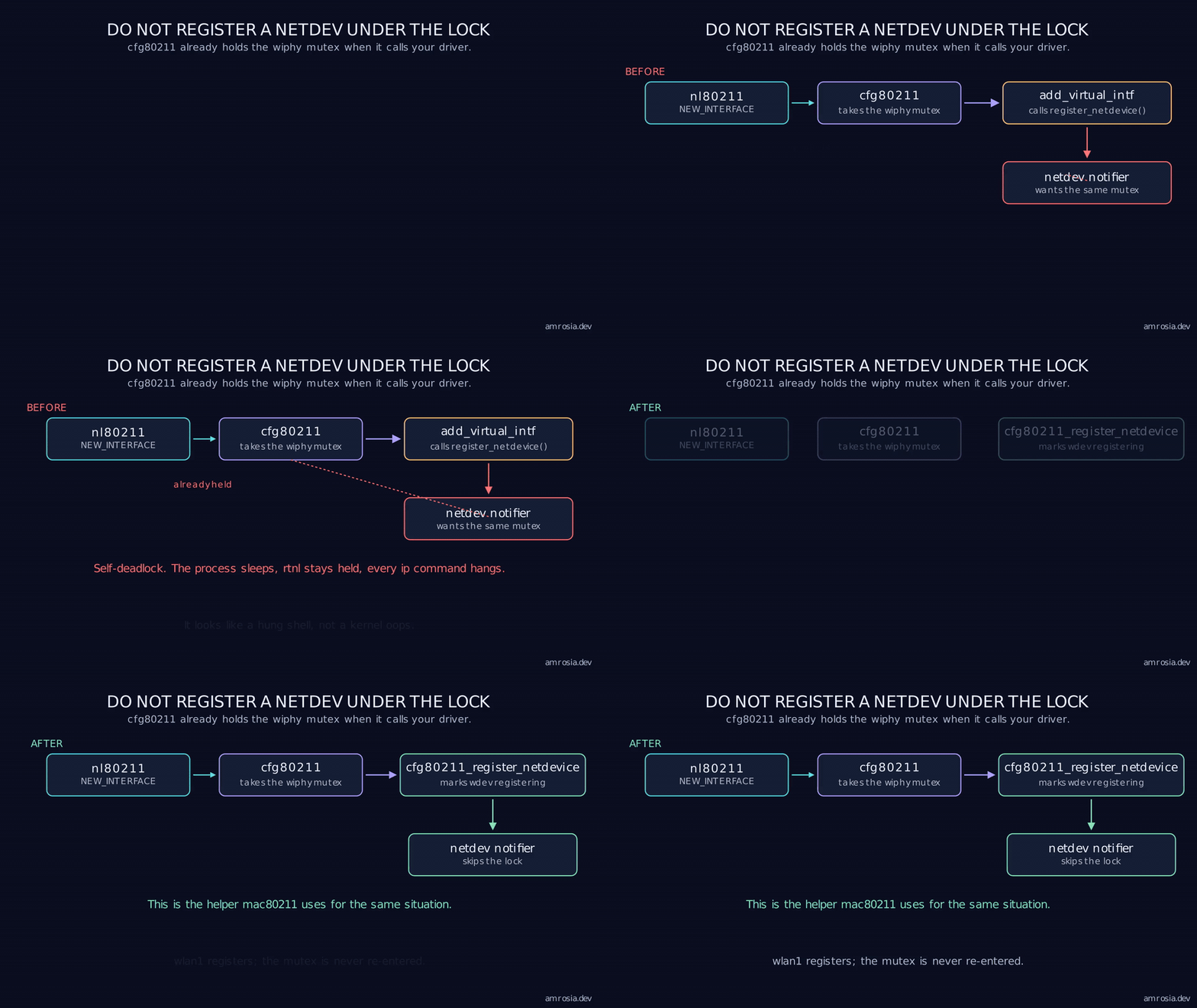
cfg80211 takes the wiphy mutex around ops->add_virtual_intf(), and the driver’s monitor-vif routine calls register_netdevice() inside that callback; the resulting NETDEV_REGISTER notification tries to take the same mutex. The symptom is not a crash: the process sits in uninterruptible sleep holding rtnl, and every later ip command hangs until reboot. The fix is the helper mac80211 itself uses — cfg80211_register_netdevice() — with cfg80211_unregister_wdev() on teardown.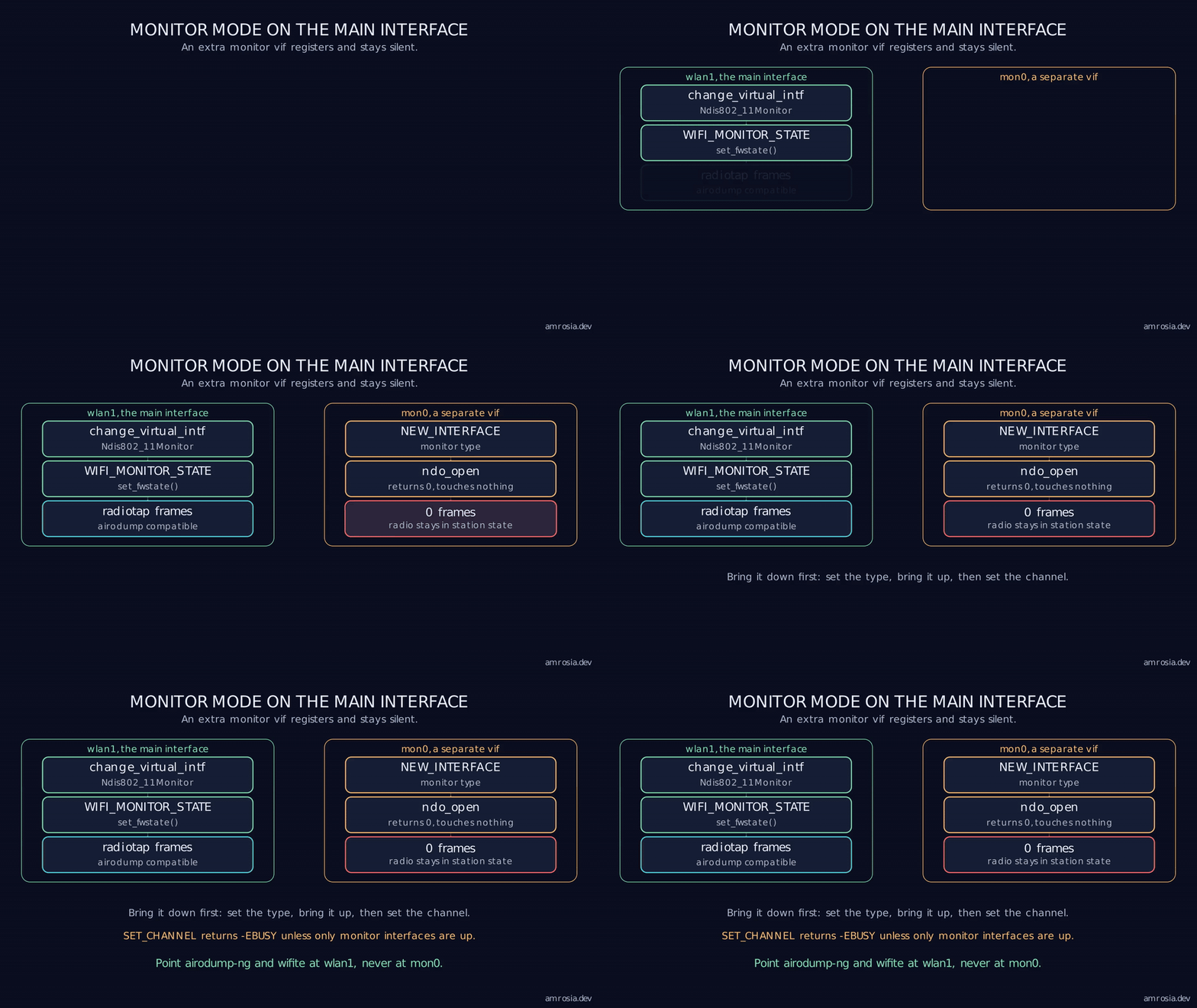
mon0 created with iw dev wlan1 interface add is a real netdev with a real radiotap header, and it receives zero frames, because this driver only enters monitor state when the main interface changes type. Convert wlan1 itself:ip link set wlan1 down
iw dev wlan1 set type monitor
ip link set wlan1 up
iw dev wlan1 set channel 6
NL80211_CMD_SET_CHANNEL returns -EBUSY unless only monitor interfaces are up — which is why airmon-ng on a managed interface fails and why the bring-up above puts wlan1 down first.wlan1 is a monitor, airmon-ng start wlan1 reports that monitor mode is already enabled and creates nothing new, which is the flow wifite expects. The driver fills radiotap headers, so airodump-ng and everything built on it parse the frames normally. Add a userspace
aircrack-ng and no iw, so the tooling needs a real userland. The reference setup is an Alpine arm64 minirootfs extracted under /data/local/tmp and entered with chroot, which is a few hundred megabytes and needs no image file: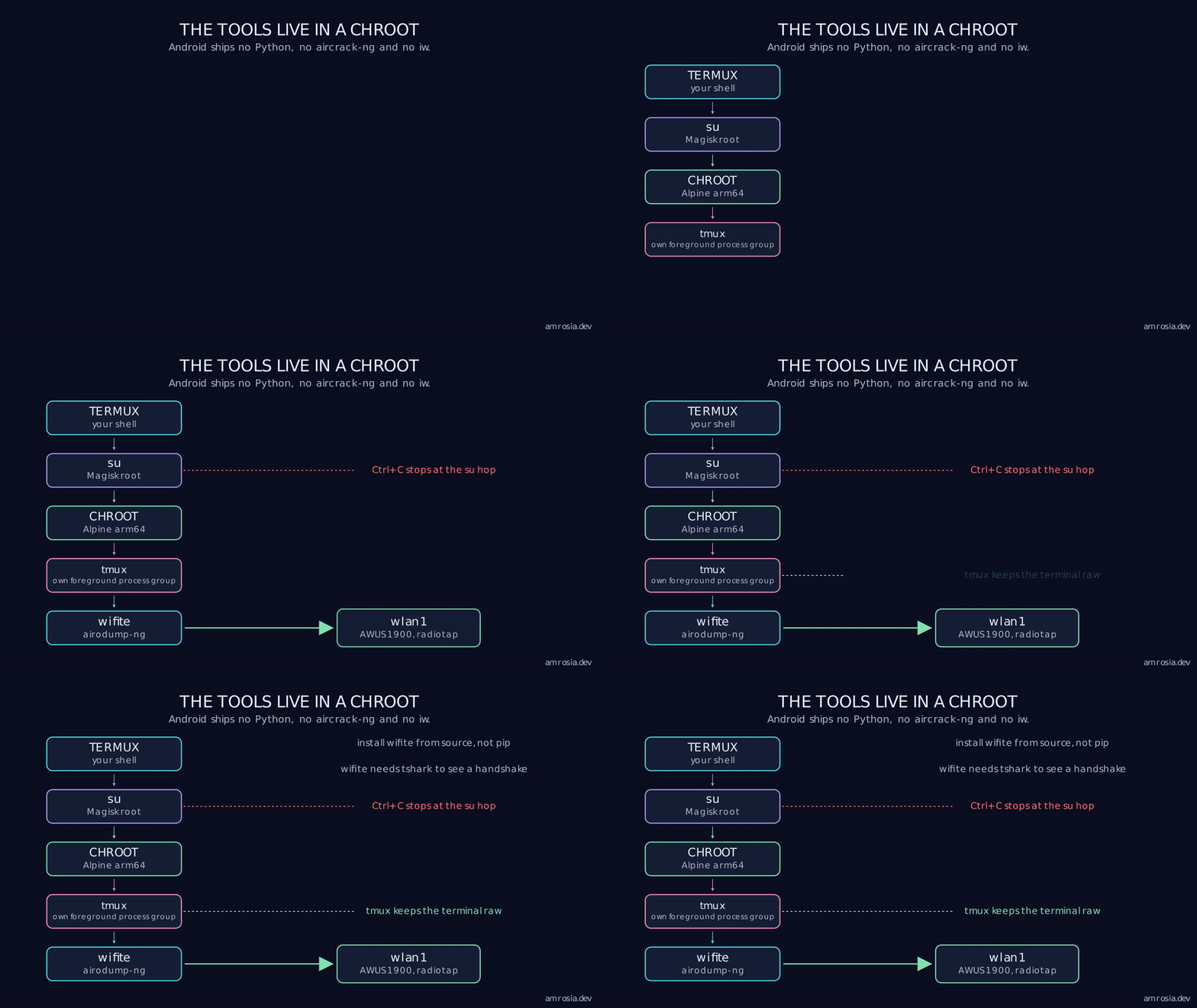
apk add python3 py3-pip iw aircrack-ng wireless-tools iproute2 rfkill procps pciutils tshark tmux
tshark is not optional if you use wifite. wifite parses capture files with tshark to decide whether a handshake exists; without it, wifite --check fails with Cannot find BSSID or ESSID in cap file, and its live detection is equally blind. Its wifite/tools/tshark.py also passes the display filter pre-quoted, which tshark 4.x rejects — drop the inner quotes.ModuleNotFoundError: No module named wifite.wifite). Run Wifite.py from the upstream tree.Ctrl+C does not survive su plus chroot: the process ends up outside the terminal’s foreground process group, so the keystroke never becomes a signal and the scan simply continues. tmux keeps the terminal raw and forwards the keystroke to a pty it owns, which restores normal control.rx_packets move, and only then start wifite:# /data/local/tmp/wifite.sh, run as root from Termux: wifite
insmod /data/local/tmp/8814au.ko # not persistent across reboots
until [ -e /sys/class/net/wlan1 ]; do sleep 1; done
sh /data/local/tmp/chroot.sh "sh /root/mon-up.sh wlan1" # down, managed, monitor, up
exec sh /data/local/tmp/chroot.sh "sh /root/wifite-tmux.sh" # tmux session runs wifite
What works
Capability Result Passive scan (nl80211) Works: 101 BSS across 2.4 and 5 GHz Monitor capture Works: 461 frames / 176 beacons in 10 s at 2437 MHz Packet injection Works: aireplay-ng -9 reports 30/30Directed deauth Works: acknowledged by the AP (code 7) Handshake capture Works: wifite captured a valid 4-way handshake, confirmed by tshark and by aircrack-ng computing the PTK PMKID attack Not tested: requires hcxdumptool5 GHz monitor Not tested: scan works, channel setup unverified Attacking your own AP Drops the tablet’s own link, since wifite deauths every client including the tablet aireplay-ng --deauth 12 -a <ap> -c <client>. And throughput is bounded by USB 2.0 and by OTG power, not by the radio. Make it survive a reboot
/data and returns intact.# after every reboot, one command:
su -c 'sh /data/local/tmp/wifite.sh'
insmod, a poll of up to 30 seconds for wlan1 to appear, monitor mode, a liveness check on rx_packets, and one driver reload if the radio came up deaf — which this driver does after Wi-Fi flaps, because it only leaves station state on an explicit type change. If wlan1 never appears, the cable is the thing to check, not the software. References